
Rewarding Progression
Watch your bakery grow from a tiny kitchen into a global cookie powerhouse, with new goals and bonuses at every step.
Bake cookies, hire grandmas and watch the numbers get ridiculous. Press play below. It runs right in your browser on desktop, tablet or phone, with no download and no account.


If you've ever clicked something just to watch a number go up, this game was made for you. You start with one big cookie and a lot of patience. Click it and you bake a cookie. Save up a few and you can hire a cursor to click for you, then a grandma to bake, then farms, mines and factories.
Before long your bakery is making cookies faster than you could ever click, even while the tab sits quietly in the background. Cookie Clicker was created by Julien “Orteil” Thiennot and released in 2013, and it's one of the games that made idle games so popular. This page is a free, unofficial way to play it: nothing to download, no account to make.
Below the game you'll find the things we wished someone had told us when we started: a short walkthrough, a plain-English look at what each building does, how golden cookies and ascending really work, and a few habits that save a lot of wasted clicks. Read it all in one go or jump to whatever you're stuck on. You can also learn more about this site and who it's for.
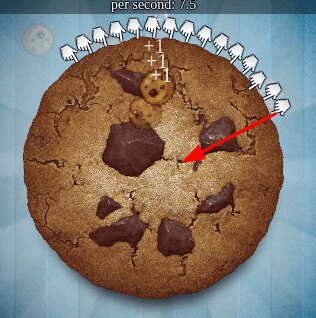
Find the giant cookie in the middle of the screen and start clicking. Each click bakes cookies and adds to your total.
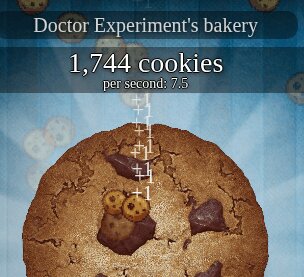
Watch the counter climb. The more you click, the sooner you can afford your first upgrades.
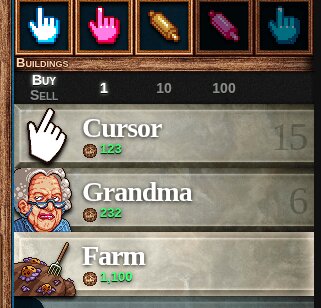
Spend cookies on cursors, grandmas, farms and more. They bake for you, so you don't have to keep clicking.
Hit milestones to earn achievements. They're fun to chase, and they give your bakery extra bonuses.
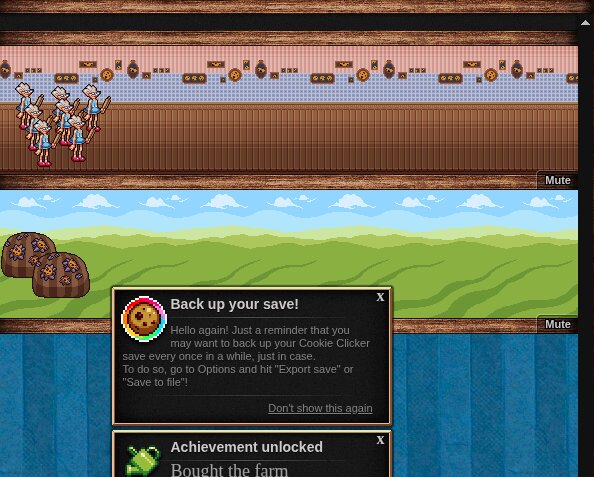
Keep upgrading and automating until your little kitchen turns into a cookie factory that never sleeps.
Cookie Clicker looks simple, and for the first few minutes it is. After that, a handful of ideas decide how fast your bakery grows. We've played it for years and still catch ourselves making the same slow mistakes, so here is the short version of what actually matters.
Your income is measured in cookies per second, or CPS, and you'll see it just under your cookie total. Every cursor, grandma, farm and factory adds to it, and upgrades multiply what those buildings already make. Buildings get pricier each time you buy one, so the cheapest item in the store isn't always the best deal. Hover over a building and the game shows how much CPS it will add, which makes comparing options easy. A good rule of thumb: the best purchase is the one that adds the most CPS for the fewest cookies, and an affordable upgrade almost always beats a new building.
You don't need to memorize the store, but knowing the first few buildings helps you plan. Each one works like this:
Past these there are many more, from shipments and portals to stranger things further along. You'll meet them naturally as your totals grow.
Every so often a golden cookie drifts onto the screen and fades out after roughly thirteen seconds. Click it in time and something good usually happens. A Frenzy multiplies your production for a little over a minute, a Lucky cookie hands you a pile of free cookies, and a Click Frenzy makes each manual click worth far more for a few seconds. Occasionally a different kind of cookie appears with a less friendly effect, so it pays to read the message that pops up. Keeping a modest cookie reserve in your bank tends to make Lucky rewards bigger, which is a small reason not to spend down to zero every time.
Ascending resets your bakery in exchange for heavenly chips. Your first chips arrive once you've baked around a trillion cookies in total, and each chip adds a permanent production bonus. Chips also buy heavenly upgrades that make later runs smoother. It can feel odd to throw away a bakery you spent hours on, but the next run climbs much faster than the last, and that loop is what keeps long-time players around. Don't rush it. Ascend when your progress has clearly slowed down.
Around holidays such as Halloween, Christmas, Valentine's Day and Easter, you can switch on a seasonal event that adds themed cookies, upgrades and collectibles. They're optional, but they're a fun way to chase achievements you won't get otherwise.
The game saves automatically in your browser, so you can close the tab and come back later. If you clear your browser data or switch to another browser or device, you'll start from scratch. Every so often, open the game's options menu and export your save as a backup. Pasting that text file into a note takes ten seconds and can save you hours.
Cookie Clicker works in any modern browser, so there's nothing to install. On a small screen, tap Fullscreen or open the game in a new tab for more room. If you're on a school or work device, please check that games are allowed on that network first.
It simply means you can load the game from an ordinary web page with no download or sign-up, which helps it work on more connections and devices. It doesn't change the game, and it isn't a way around anyone's rules.
Watch your bakery grow from a tiny kitchen into a global cookie powerhouse, with new goals and bonuses at every step.

Choosing what to buy and when is the fun part. A good pick can double your output.

Click like crazy to speed things up, or leave it running and check back later.

No timers, no pressure. Play for two minutes or two hours, whatever suits your day.

Ascend for permanent bonuses that make every future run faster and more satisfying.

The basics take seconds to learn, and there's plenty of depth for experienced players.
Cookie Clicker UK is an idle (or incremental) game where you click a giant cookie to bake cookies, then spend them on buildings and upgrades that bake even more. Your bakery keeps growing even while you're away from the screen.
Press play, then click the big cookie. Spend your cookies on cursors, grandmas, farms and upgrades so your bakery makes cookies on its own. Keep an eye out for golden cookies and achievements for extra boosts.
Yes. You can play in your browser for free, with no download, no account and no subscription.
Yes. It runs in the browser on most phones and tablets. If the game area feels small, use the Fullscreen button or open the game in a new tab.
The game saves automatically in your browser. Clearing your browser data or switching to a different browser or device means you'll start fresh, so use the export save option in the game's options menu to keep a backup.
Golden cookies appear on screen every so often and fade after about thirteen seconds. Click one quickly and you usually get a bonus, such as a boost to your cookie production or a pile of free cookies.
Ascending resets your bakery in exchange for heavenly chips, a prestige currency that gives permanent production bonuses. Every run after that starts a little faster than the last.
There's no single right moment. Most players wait until their income has clearly slowed and they have a decent number of heavenly chips waiting, since the first chips only arrive after roughly a trillion cookies baked in total.
Start with a few cursors and your first grandma, then check the upgrade shelf after every purchase. Cheap upgrades usually give more CPS per cookie than a new building.
The game stores your save in your browser. Clearing cookies and site data, using private browsing, or switching browsers or devices will remove it. Export your save from the options menu to keep a copy.
Yes, in most browsers your bakery keeps baking, though some browsers slow background tabs. You may also miss golden cookies while the tab is hidden.
This site may show banner ads. They help pay for hosting and keep the game free.
Only minimal, non-personal data for analytics and performance. You can read the details in our Privacy Policy.
No. This is an unofficial fan site. Cookie Clicker was created by Orteil (Julien Thiennot), and all rights to the game belong to its creator. You can visit the official Cookie Clicker site to support him directly.
Use the details on our Contact page to report a bug, ask a question or send a suggestion.